Turbo Studio 2.9.504
Released 23 Nov 2022
Hotfix release
As the result of some refactoring done to improve the application`s quality, the reading of the bike settings failed for TCD-w and TCU displays running on old firmware. Following firmware version or lower were affected: TCD-w (FW 12.4.0) and TCU (FW 1A.B.0).
Error shown:
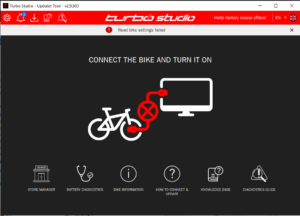
This new version of Turbo Studio includes a bugfix for that issue, to be able to connect and update these affected bikes again.
Turbo Studio 2.9.503
Released 15 Nov 2022
What’s new
- Release Notes
- Updating SL Range Extender Batteries without a bike
- Battery diagnostics improvements
- Service Manager improvements
- Language Support for Portuguese, Chinese Traditional, Chinese Simplified
Release Notes
From now on, after every Turbo Studio update, we will inform you about the changes in the release notes section.
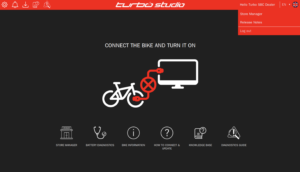
To get back to the Release Notes at any time, click on your user name in the header, and select „Release Notes”.
Updating SL Range Extender Batteries without a bike
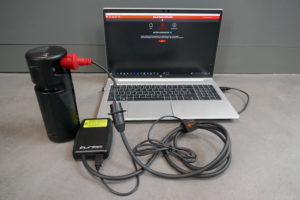
You can now run firmware updates of SL Range Extender Batteries by connecting the battery itself to a computer running Turbo Studio. The battery does not have to be connected to a bike. This simplifies and speeds up the updating procedure.
Please connect Range Extender Batteries by using the SL System diagnostics adapter (S216800010) together with the diagnostics tool (989E-5610) tool, as shown in the image. This connection method also allows diagnosing an SL battery.
Notes:
- You can still update Range Extender Batteries as normal (battery connected to system and using a USB connection to Turbo Studio)
- When updating Range Extender Batteries standalone, ensure that you have no bike connected to the PC through a USB cable
Battery Diagnostics Improvements
Since we launched Battery Diagnostics in Turbo Studio 2.8 in April 2022, we have received a lot of valuable feedback how to further improve this feature. We took action and are happy to offer you a better user experience by pre-filling information whenever possible, better validation of the data entered and sharing more targeted diagnostics messages.
Service Manager improvements
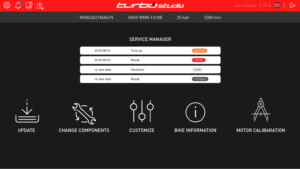
We have created a better experience working with Service Activities.
The overall speed and loading behaviour of Service Activities within Turbo Studio has improved, together with the below fixes and improvements.
- The Service PDFs of completed Services Activities can now be found in your Store Manager section.
- The e-mail on a Handover Service Activity is not a mandatory field anymore to complete the Handover process.
- With one click, you can now check off an entire phase instead of manually marking every single step
- Optional steps don’t need to be checked anymore at all. It saves you an extra click – just leave the checkbox empty if you did not complete that work.
- To facilitate adding additional work to a Service Activity, you can now quickly pick from a list of the most common work carried out on a bike
We are there to support you
Whilst we continue to make further improvements to Turbo Studio, we are always there for your feedback and to investigate any problem reports. Please do not hesitate to reach out to your Service / Rider Care team. In case of Turbo Studio problems, please provide the following details, so that the teams can support you as best as possible remotely:
- Your Turbo Studio user name
- Bike serial number
- A short description of the problem, ideally with screen grabs of Turbo Studio
- Day and time you encountered the problem (approx. time of day is sufficient
)